

Online booking for rentals is a real-time digital system that connects a rental property's inventory directly to an online platform, letting customers search, select dates, pay, and receive confirmation without a single phone call. The moment a reservation is made, availability updates automatically across every channel, eliminating the double-booking risk that plagues manual systems. Whether you're booking a vacation cottage through Airbnb, a beach house on VRBO, or a scooter for a weekend trip, the underlying mechanics are the same.
Here's what a modern rental booking system actually does:
- Real-time inventory sync: Available units update instantly the moment a booking is confirmed
- Self-service selection: Customers choose dates, property type, and add-ons without staff involvement
- Integrated payment: Credit cards, Apple Pay, and Google Pay are processed through a secure gateway at the time of booking
- Deposit collection: A partial or full payment secures the reservation and dramatically reduces no-shows
- Automatic confirmation: Email and SMS receipts go out immediately, with booking details and any required documents
- 24/7 access: Customers book at 11 PM on a Sunday just as easily as they would at noon on a Tuesday
Over 65% of rental bookings originate from an initial online search, with more than 60% of consumers preferring self-service booking to staff interaction as of 2026. That preference has only grown since 2023.
How to book a vacation rental online, step by step
The online rental booking process follows a clear sequence. Understanding each step helps you move through it faster and avoid common mistakes.
Step 1: Search and filter Start on a platform like Airbnb or VRBO, or go directly to a rental company's website. Enter your destination, travel dates, and the number of guests. Use filters for price range, property type, amenities (pool, pet-friendly, parking), and cancellation flexibility. Narrowing results early saves time and surfaces better matches.

Step 2: Review listings carefully Click into listings that look promising. Read the full description, not just the headline. Check the photo gallery for every room, not just the hero shot. Look at the map location relative to where you actually plan to spend time. A property listed as "beachfront" can mean very different things depending on how the host defines it.

Step 3: Verify real-time availability Most platforms show a live calendar. Dates that are grayed out are already booked or blocked by the host. When you select your dates, the system checks live inventory and confirms the unit is available for that exact window. No back-and-forth emails, no waiting for a callback.
Step 4: Make the reservation Select your dates, review the total price breakdown (nightly rate, cleaning fee, service fee, taxes), and proceed to payment. You'll typically pay a deposit or the full amount upfront via an integrated payment gateway. The system locks the unit the moment payment is authorized.
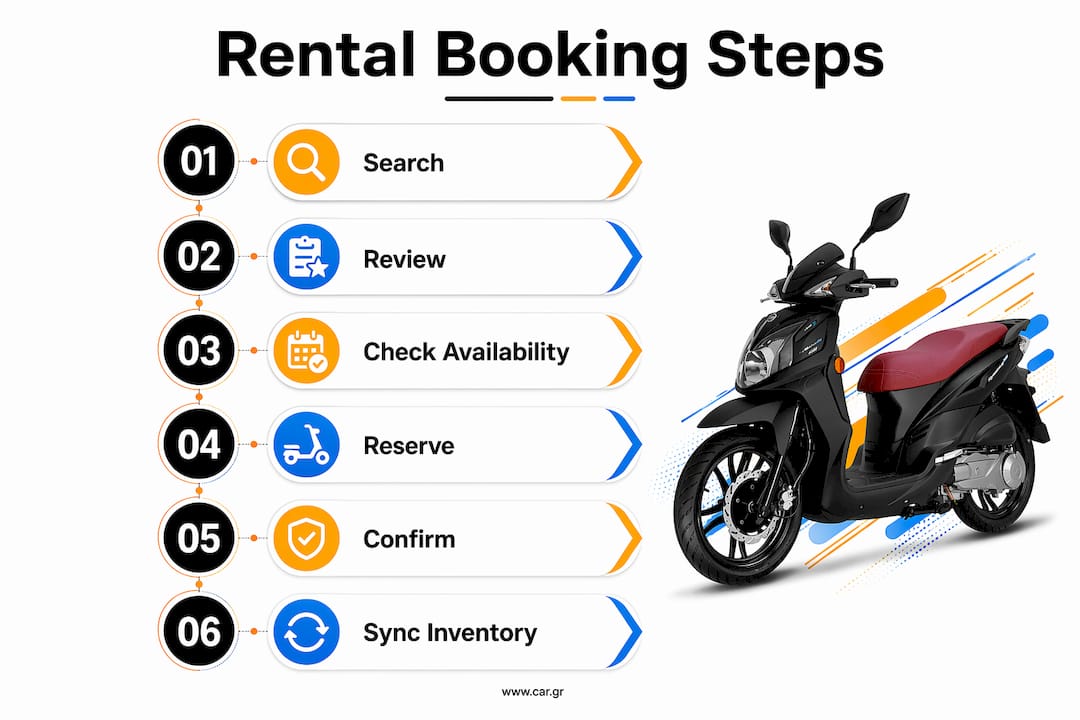
Step 5: Receive automatic confirmation Within seconds, a confirmation email lands in your inbox with your booking reference, check-in instructions, host contact details, and any required documents like rental agreements or waivers. Some platforms also send an SMS. Your booking appears in the platform's app under your account.
Step 6: Inventory updates across all channels Behind the scenes, the system marks those dates as unavailable everywhere the property is listed. Whether the host lists on multiple platforms or just one, the same inventory pool is referenced. This is what prevents two guests from booking the same property for the same week.
Pro Tip: Book mid-week when possible. Many hosts update their pricing algorithms on weekends, and mid-week searches often surface lower rates and better availability, especially for last-minute trips.
How to choose the right vacation rental online
Picking the right rental takes more than finding a place that looks nice in photos. These are the factors that actually determine whether a booking goes smoothly.
- Location specifics: Use the map view, not just the neighborhood label. Check the distance to the beach, city center, or wherever you're actually going. A "5-minute walk to downtown" can mean very different things.
- Verified reviews: Read recent reviews, not just the overall star rating. Look for patterns across multiple guests. One bad review is noise; three guests mentioning the same broken AC is a signal. On platforms like Airbnb and VRBO, reviews are tied to confirmed stays, which makes them harder to fake.
- Transparent pricing: Always click through to the full price breakdown before booking. Cleaning fees and service charges can significantly increase the nightly rate. A listing at $80/night that carries a $150 cleaning fee is not actually a budget option.
- Cancellation policy clarity: Platforms categorize policies as flexible, moderate, or strict. Know exactly what you get back and by when if your plans change. This is especially important for trips booked months in advance.
- Trust signals: Look for secure payment badges, verified host status, and clear rental terms on the booking page. On independent rental sites, check for SSL encryption (the padlock in your browser's address bar) before entering any payment details.
- Mobile-friendly experience: A booking platform that's hard to navigate on a phone is a red flag. A large portion of rental searches now happen on smartphones, and well-designed platforms have built their entire checkout flow around that reality.
- Additional fees and rules: House rules, pet policies, noise restrictions, and check-in windows all matter. Read them before booking, not after you arrive.
Tips for a smooth and secure online booking experience
Most booking problems are avoidable. These practices keep your reservation safe and your experience predictable.
- Only book through encrypted platforms: The URL should start with
https://. Never enter payment details on a site without SSL encryption. - Use a credit card, not a debit card: Credit cards offer stronger fraud protection and easier dispute resolution if something goes wrong with a booking.
- Don't wire money or pay outside the platform: Legitimate rental platforms process all payments through their own systems. Any request to pay via bank transfer or gift card is a scam.
- Screenshot your confirmation: Save or print your booking confirmation immediately. Include the cancellation policy, check-in details, and host contact information.
- Watch for suspiciously low prices: A listing priced far below comparable properties in the same area often signals a fraudulent listing or a property with serious undisclosed issues.
- Verify the confirmation email matches the platform: Phishing emails mimicking Airbnb or VRBO are common. Always log into your account directly to confirm your booking is actually there.
Pro Tip: Booking directly through a rental company's own website, rather than a third-party marketplace, often gives you lower prices (no platform commission is passed to you), faster customer support, and more flexible terms. Motorent, for example, handles bookings directly so travelers get real-time availability and immediate support without a middleman.
How technology makes online rental booking work
The experience of clicking "Book Now" and getting an instant confirmation feels simple. The technology running underneath it is not.
- Real-time availability engines: These are the core of any booking system. They maintain a live count of available units and lock inventory the moment a reservation begins. Any delay in this sync, even a few minutes, creates a window where two customers can book the same property.
- Mobile-responsive design: Platforms built for mobile don't just shrink a desktop layout. They redesign the checkout flow for small screens: larger buttons, fewer form fields, faster load times. Poor mobile UX causes booking abandonment at the payment step, which is the worst possible place to lose a customer.
- Integrated payment processors: Stripe, PayPal, and similar gateways handle deposits, full payments, and refunds inside the same system. Keeping payment and inventory in one place eliminates the manual reconciliation errors that come from using separate tools.
- Automated confirmations and reminders: Every booking triggers an instant confirmation. Pre-arrival reminders sent the day before and the morning of pickup reduce no-shows by keeping the reservation top of mind for guests who might otherwise forget.
- Multi-channel inventory synchronization: When a property is listed on multiple platforms simultaneously, a channel manager keeps availability identical across all of them. A booking on one platform immediately blocks those dates everywhere else.
Stat to know: Online bookings with automated confirmations and deposit collection reduce no-shows by 30–50% compared to phone-only reservations without upfront payment.
What 2026 research shows about online booking's impact on rentals
The operational and revenue case for online booking has gotten clearer as more data comes in. Here's what the numbers actually show.
- No-show reduction: Customers who book online and pay a deposit are roughly three times less likely to no-show than those who book by phone without upfront payment. The deposit creates accountability; the automated reminder handles the honest forgetters.
- Staff time recovered: Each phone booking consumes 4–8 minutes of staff time, including the call, data entry, and follow-up confirmation. Moving standard reservations online reclaims that time for guests who genuinely need help.
- After-hours revenue: A rental business that closes at 6 PM still has customers searching at 10 PM. Online booking captures after-hours demand that a phone-only operation loses entirely, turning a closed storefront into a 24/7 sales channel.
- The hybrid model works: A 60–70% online, 30–40% phone split is the practical sweet spot for most rental businesses. Simple, standard reservations go online. Complex, high-value inquiries still get a human.
- Mobile traffic dominates: With over 70% of rental searches happening on smartphones, platforms that haven't prioritized mobile checkout are losing bookings at the final step.
- Upsells at checkout: A well-built booking flow offers relevant add-ons (insurance, equipment upgrades, delivery) to every customer at the moment they're already paying. A staffed counter only upsells when someone remembers to ask.
The rental businesses pulling ahead in 2026 aren't just using online booking as a convenience layer. They're treating it as the operational core, with inventory, payments, and guest communication all running through a single system. For a closer look at how rental policies fit into this picture, the details matter more than most travelers realize.
Cancellation policies and how to manage bookings online
Cancellation policies are one of the most important things to read before you confirm a reservation, and one of the most commonly ignored.
Most platforms use a tiered structure. A flexible policy typically offers a full refund if you cancel at least 24–48 hours before check-in. A moderate policy usually refunds a portion if you cancel within a set window, often 5–7 days out. A strict policy may offer no refund at all, or only a partial one if you cancel weeks in advance. The exact terms vary by platform and host, so read the specific policy on your booking page, not just the category label.
Managing an existing booking is straightforward on most platforms. Log into your account, find the reservation, and look for the "Modify" or "Cancel" option. Changes to dates are subject to availability and the host's approval. Cancellations trigger the refund process automatically based on the policy terms, and most platforms process refunds within 5–10 business days depending on your payment method.
If something goes wrong, such as a property that doesn't match its listing or a host who cancels last minute, most major platforms have a guest protection program. Document the issue with photos and contact platform support through the official channel, not just the host directly. For a full breakdown of how cancellation terms work across different rental types, the specifics can save you real money.
One underused feature: many platforms let you purchase travel insurance or a cancellation waiver at checkout. For trips booked far in advance or during peak season when refunds are unlikely, that add-on is often worth the cost.
Ready to book your next rental online?

Motorent makes the entire process exactly as straightforward as it should be. Browse the full scooter and motorbike fleet, check live availability for your dates in Thessaloniki or Halkidiki, and confirm your booking in minutes with secure online payment. No phone calls, no waiting, no surprises. Book your scooter rental directly and get instant confirmation with 24/7 support behind it.
Key Takeaways
Online booking for rentals works because real-time inventory sync, automated payment, and instant confirmation together eliminate the friction, errors, and no-shows that manual reservation systems create.
| Point | Details |
|---|---|
| Real-time availability prevents double bookings | Inventory updates the moment a reservation is confirmed, across every channel simultaneously. |
| Deposits cut no-show rates by 30–50% | Online bookings with automated confirmations and deposit collection reduce no-shows by 30–50% compared to phone-only reservations. Customers who pay upfront are far more likely to show up or cancel in time to rebook the slot. |
| Mobile-first design is non-negotiable | Over 70% of rental searches happen on smartphones; poor mobile checkout loses bookings at the final step. |
| The hybrid model balances automation and service | A 60–70% online, 30–40% phone split lets staff focus on complex inquiries while routine bookings run themselves. |
| Read cancellation policies before confirming | Policy tiers (flexible, moderate, strict) determine your refund, and the details vary significantly by platform and host. |
FAQ
What is the biggest advantage of booking a rental online?
The main advantage is 24/7 access combined with instant confirmation. You can secure a reservation at any hour without waiting for a callback, and the system locks availability immediately so no one else can take the same dates.
What is a disadvantage of online booking for rentals?
The main drawback is that complex or high-value requests, such as group bookings with custom logistics, are harder to handle through a self-service flow. Some guests also prefer speaking with someone before committing, which a purely automated system doesn't accommodate.
What is the 80/20 rule for Airbnb?
The 80/20 principle applied to Airbnb hosting suggests that Hosts often see a majority of their revenue come from a small portion of their peak dates or top-performing listings. Hosts use this to prioritize pricing and availability management during high-demand periods rather than treating every night equally.
How do I verify that a rental listing is legitimate before booking?
Book through platforms that tie reviews to confirmed stays, check that the listing has multiple recent reviews with consistent detail, and never pay outside the platform's official payment system. Any request to wire money or pay via gift card is a fraud signal.
Does booking directly with a rental company save money?
Often yes. Third-party platform commissions typically involve a significant percentage per booking, and some of that cost is passed to the guest through service fees. Booking directly through a rental company's own site can reduce or eliminate those fees while giving you faster access to customer support.